> ## Documentation Index
> Fetch the complete documentation index at: https://docs.thehuxdesign.com/llms.txt
> Use this file to discover all available pages before exploring further.
# Context Menu
> Right-click context menus with smart positioning and cross-platform support
## Overview
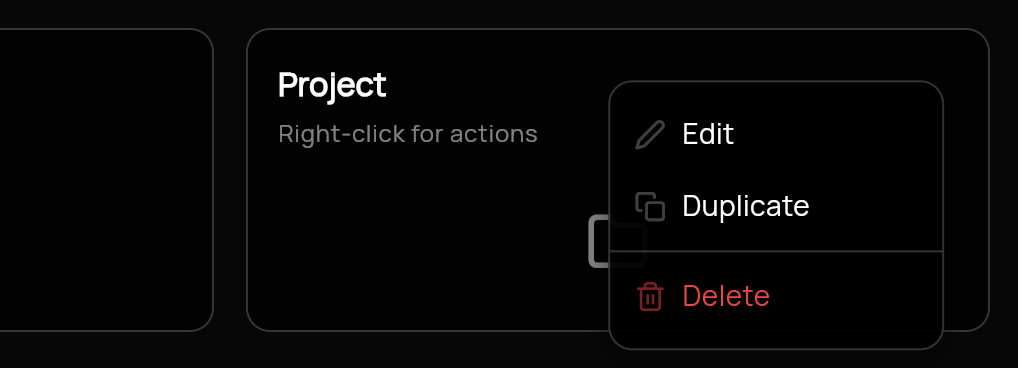
Hux UI provides a comprehensive context menu system with smart positioning and cross-platform support:
* **HuxContextMenu** - Main wrapper widget with smart positioning
* **HuxContextMenuItem** - Individual menu items with icons and states
* **HuxContextMenuDivider** - Visual separators for menu groups
 ## Component Variants
### Basic Context Menu
Simple context menu with basic actions:
```dart theme={null}
HuxContextMenu(
menuItems: [
HuxContextMenuItem(
text: 'Copy',
icon: FeatherIcons.copy,
onTap: () => print('Copy action'),
),
HuxContextMenuItem(
text: 'Paste',
icon: FeatherIcons.clipboard,
onTap: () => print('Paste action'),
),
],
child: Text('Right-click me!'),
)
```
### Context Menu with Dividers
Organized menu with visual separators:
```dart theme={null}
HuxContextMenu(
menuItems: [
HuxContextMenuItem(
text: 'Copy',
icon: FeatherIcons.copy,
onTap: () => print('Copy action'),
),
HuxContextMenuItem(
text: 'Paste',
icon: FeatherIcons.clipboard,
onTap: () => print('Paste action'),
),
const HuxContextMenuDivider(),
HuxContextMenuItem(
text: 'Delete',
icon: FeatherIcons.trash2,
onTap: () => print('Delete action'),
isDestructive: true,
),
],
child: Container(
padding: const EdgeInsets.all(20),
child: const Text('Right-click me!'),
),
)
```
### Context Menu with Disabled Items
Menu with disabled and destructive actions:
```dart theme={null}
HuxContextMenu(
menuItems: [
HuxContextMenuItem(
text: 'Edit',
icon: FeatherIcons.edit2,
onTap: () => print('Edit action'),
),
HuxContextMenuItem(
text: 'Duplicate',
icon: FeatherIcons.copy,
onTap: () => print('Duplicate action'),
isDisabled: true, // Disabled item
),
const HuxContextMenuDivider(),
HuxContextMenuItem(
text: 'Delete',
icon: FeatherIcons.trash2,
onTap: () => print('Delete action'),
isDestructive: true, // Destructive action
),
],
child: Icon(Icons.more_vert),
)
```
### File Context Menu
Context menu for file operations:
```dart theme={null}
HuxContextMenu(
menuItems: [
HuxContextMenuItem(
text: 'New File',
icon: FeatherIcons.filePlus,
onTap: () => _createNewFile(),
),
HuxContextMenuItem(
text: 'Open',
icon: FeatherIcons.folderOpen,
onTap: () => _openFile(),
),
const HuxContextMenuDivider(),
HuxContextMenuItem(
text: 'Rename',
icon: FeatherIcons.edit2,
onTap: () => _renameFile(),
),
HuxContextMenuItem(
text: 'Delete',
icon: FeatherIcons.trash2,
onTap: () => _deleteFile(),
isDestructive: true,
),
],
child: FileIcon(),
)
```
## Basic Usage
## Features
* **Smart Positioning** - Automatic menu positioning to prevent screen overflow
* **Cross-Platform** - Works on desktop, mobile, and web
* **Web Optimization** - Proper browser context menu prevention
* **Consistent Design** - Follows Hux UI design system
* **Theme Aware** - Adapts to light and dark themes
## Components
### HuxContextMenu
Main wrapper that handles context menu display and positioning.
**Properties:**
* `menuItems` - List of menu items and dividers
* `child` - Widget that triggers the context menu
### HuxContextMenuItem
Individual menu item with icon, text, and interaction handling.
**Properties:**
* `text` - Menu item label
* `icon` - Optional icon (FeatherIcons recommended)
* `onTap` - Action callback
* `isDisabled` - Whether the item is disabled
* `isDestructive` - Whether the item represents a destructive action
### HuxContextMenuDivider
Visual separator for organizing menu items into groups.
```dart theme={null}
const HuxContextMenuDivider()
```
## Advanced Example
```dart theme={null}
HuxContextMenu(
menuItems: [
// File operations
HuxContextMenuItem(
text: 'New File',
icon: FeatherIcons.filePlus,
onTap: () => _createNewFile(),
),
HuxContextMenuItem(
text: 'Open',
icon: FeatherIcons.folderOpen,
onTap: () => _openFile(),
),
const HuxContextMenuDivider(),
// Edit operations
HuxContextMenuItem(
text: 'Cut',
icon: FeatherIcons.scissors,
onTap: () => _cutSelection(),
isDisabled: !_hasSelection,
),
HuxContextMenuItem(
text: 'Copy',
icon: FeatherIcons.copy,
onTap: () => _copySelection(),
isDisabled: !_hasSelection,
),
HuxContextMenuItem(
text: 'Paste',
icon: FeatherIcons.clipboard,
onTap: () => _pasteClipboard(),
isDisabled: !_hasClipboardContent,
),
const HuxContextMenuDivider(),
// Destructive operations
HuxContextMenuItem(
text: 'Delete',
icon: FeatherIcons.trash2,
onTap: () => _deleteSelection(),
isDestructive: true,
isDisabled: !_hasSelection,
),
],
child: YourContentWidget(),
)
```
## Platform Support
* **Desktop** - Right-click support with proper positioning
* **Mobile** - Long-press gesture support
* **Web** - Proper browser context menu prevention
Context menus automatically prevent the browser's default context menu on web platforms using the universal\_html package.
## Examples
See context menus in a file management interface
Learn how to implement editor context menus
Right-click any component in the [example app](https://github.com/lofidesigner/hux/tree/main/example) to see context menus in action!
## Component Variants
### Basic Context Menu
Simple context menu with basic actions:
```dart theme={null}
HuxContextMenu(
menuItems: [
HuxContextMenuItem(
text: 'Copy',
icon: FeatherIcons.copy,
onTap: () => print('Copy action'),
),
HuxContextMenuItem(
text: 'Paste',
icon: FeatherIcons.clipboard,
onTap: () => print('Paste action'),
),
],
child: Text('Right-click me!'),
)
```
### Context Menu with Dividers
Organized menu with visual separators:
```dart theme={null}
HuxContextMenu(
menuItems: [
HuxContextMenuItem(
text: 'Copy',
icon: FeatherIcons.copy,
onTap: () => print('Copy action'),
),
HuxContextMenuItem(
text: 'Paste',
icon: FeatherIcons.clipboard,
onTap: () => print('Paste action'),
),
const HuxContextMenuDivider(),
HuxContextMenuItem(
text: 'Delete',
icon: FeatherIcons.trash2,
onTap: () => print('Delete action'),
isDestructive: true,
),
],
child: Container(
padding: const EdgeInsets.all(20),
child: const Text('Right-click me!'),
),
)
```
### Context Menu with Disabled Items
Menu with disabled and destructive actions:
```dart theme={null}
HuxContextMenu(
menuItems: [
HuxContextMenuItem(
text: 'Edit',
icon: FeatherIcons.edit2,
onTap: () => print('Edit action'),
),
HuxContextMenuItem(
text: 'Duplicate',
icon: FeatherIcons.copy,
onTap: () => print('Duplicate action'),
isDisabled: true, // Disabled item
),
const HuxContextMenuDivider(),
HuxContextMenuItem(
text: 'Delete',
icon: FeatherIcons.trash2,
onTap: () => print('Delete action'),
isDestructive: true, // Destructive action
),
],
child: Icon(Icons.more_vert),
)
```
### File Context Menu
Context menu for file operations:
```dart theme={null}
HuxContextMenu(
menuItems: [
HuxContextMenuItem(
text: 'New File',
icon: FeatherIcons.filePlus,
onTap: () => _createNewFile(),
),
HuxContextMenuItem(
text: 'Open',
icon: FeatherIcons.folderOpen,
onTap: () => _openFile(),
),
const HuxContextMenuDivider(),
HuxContextMenuItem(
text: 'Rename',
icon: FeatherIcons.edit2,
onTap: () => _renameFile(),
),
HuxContextMenuItem(
text: 'Delete',
icon: FeatherIcons.trash2,
onTap: () => _deleteFile(),
isDestructive: true,
),
],
child: FileIcon(),
)
```
## Basic Usage
## Features
* **Smart Positioning** - Automatic menu positioning to prevent screen overflow
* **Cross-Platform** - Works on desktop, mobile, and web
* **Web Optimization** - Proper browser context menu prevention
* **Consistent Design** - Follows Hux UI design system
* **Theme Aware** - Adapts to light and dark themes
## Components
### HuxContextMenu
Main wrapper that handles context menu display and positioning.
**Properties:**
* `menuItems` - List of menu items and dividers
* `child` - Widget that triggers the context menu
### HuxContextMenuItem
Individual menu item with icon, text, and interaction handling.
**Properties:**
* `text` - Menu item label
* `icon` - Optional icon (FeatherIcons recommended)
* `onTap` - Action callback
* `isDisabled` - Whether the item is disabled
* `isDestructive` - Whether the item represents a destructive action
### HuxContextMenuDivider
Visual separator for organizing menu items into groups.
```dart theme={null}
const HuxContextMenuDivider()
```
## Advanced Example
```dart theme={null}
HuxContextMenu(
menuItems: [
// File operations
HuxContextMenuItem(
text: 'New File',
icon: FeatherIcons.filePlus,
onTap: () => _createNewFile(),
),
HuxContextMenuItem(
text: 'Open',
icon: FeatherIcons.folderOpen,
onTap: () => _openFile(),
),
const HuxContextMenuDivider(),
// Edit operations
HuxContextMenuItem(
text: 'Cut',
icon: FeatherIcons.scissors,
onTap: () => _cutSelection(),
isDisabled: !_hasSelection,
),
HuxContextMenuItem(
text: 'Copy',
icon: FeatherIcons.copy,
onTap: () => _copySelection(),
isDisabled: !_hasSelection,
),
HuxContextMenuItem(
text: 'Paste',
icon: FeatherIcons.clipboard,
onTap: () => _pasteClipboard(),
isDisabled: !_hasClipboardContent,
),
const HuxContextMenuDivider(),
// Destructive operations
HuxContextMenuItem(
text: 'Delete',
icon: FeatherIcons.trash2,
onTap: () => _deleteSelection(),
isDestructive: true,
isDisabled: !_hasSelection,
),
],
child: YourContentWidget(),
)
```
## Platform Support
* **Desktop** - Right-click support with proper positioning
* **Mobile** - Long-press gesture support
* **Web** - Proper browser context menu prevention
Context menus automatically prevent the browser's default context menu on web platforms using the universal\_html package.
## Examples
See context menus in a file management interface
Learn how to implement editor context menus
Right-click any component in the [example app](https://github.com/lofidesigner/hux/tree/main/example) to see context menus in action!